Embedding loads YouTube. The direct link opens the original video instead.
Our selection
From acid to image salad
Paul Birken is the starting point. Follow the trail into rhythmic video sampling, cut-up television, net art and surreal sample cinema. “Trash” is our curatorial umbrella, not a shared genre or a label claimed by every artist.
Mikro · Tools by Michael Suding
From loop to wall.
A strange image, a short snippet, a repeat at just the right moment: a whole visual world can start there. For anyone inspired by this journey through video sampling and media collage, Hirnflimmern creator Michael Suding is developing two apps for making your own moving images. MikroPacker prepares the material. MikroMapper turns it into a live projection.
In development · Preview
01 // Cut & prepare
MikroPacker
Drop it in. Cut. Optimise. Export.
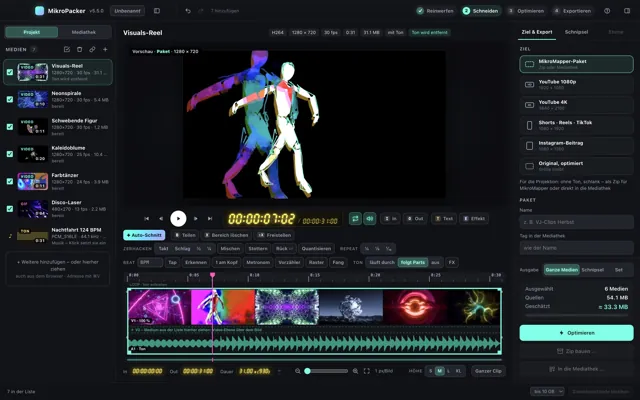
Screen shown in the manual · v5.5
A long film becomes a collection of visual building blocks: MikroPacker detects hard scene cuts, collects the snippets you mark and exports selected pieces as separate files. Beat detection, tap tempo and frame-accurate editing help you rearrange the footage rhythmically. Chop, stutter, repeat and reverse turn movement into a pattern.
18 effects, 14 transitions, animated text and additional video layers give the images their own character. Export an optimised media pack for MikroMapper or a video for YouTube, Reels and TikTok. You can also turn photos into moving clips, ready for VJ sets, music videos, stages and your next strange idea.
Planned release: December 2026 Mac & Windows planned
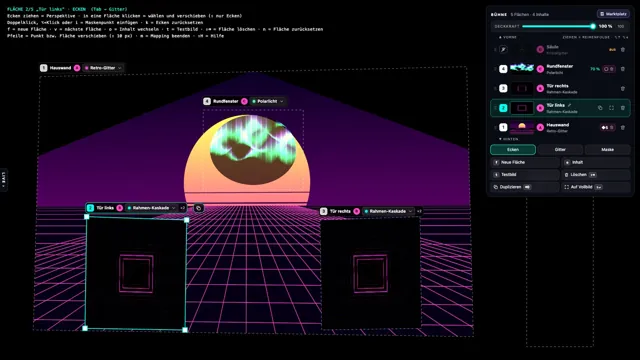
The screen is only the beginning. MikroMapper maps videos, images, text and shaders onto walls, objects, façades and stage scenery. Draw surfaces, adjust perspective with their corners and use masks to cut the image to shape. Grids adapt it to curved surfaces; blend modes and soft edges bring separate projections together.
721 animations, including 156 GPU visuals, offer a starting point; your own media and ISF shaders expand the repertoire. Tempo, audio and MIDI drive the images, while the set matrix recalls prepared combinations. Your collected loops become a playable visual instrument, from a small object on a table to a stage installation.
Planned release: November 2026 Mac & Windows planned
Jeroen Hofs works with audiovisual samples, custom software and physical control. His SenSorSuit triggers samples through movement: an instrument made of image, sound and body.
Electronic beats meet surreal animation. WAMONO joins HIFANA’s music with visuals by +CRUZ / W+K Tokyo Lab, combining ukiyo-e references and strange characters.
WAMONO · Musik: HIFANA / Video: +CRUZ (W+K Tokyo Lab)
The duo connects film fragments and music history. Astro Black uses science fiction and Afrofuturism to build an alternative narrative of musical connections.